Once your device is connected, you can modify the stimulation settings to better suit your personal comfort or enhance its effectiveness. This customisation allows you to tailor the device’s performance to your specific needs.
Access this feature by tapping the “Stimulation settings” button or the image of your CUE device on the home screen, or tap the “MY CUE” menu from the bottom bar.
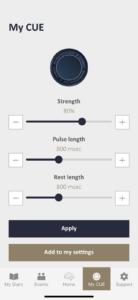
Here, you will see three sliders that you can tap or drag to adjust the stimulation.
The ‘Strength’ slider adjusts how intense the vibration feels. ‘Pules Length’ controls how long each vibration pulse lasts, and ‘Rest Length’ determines the pause length between each vibration. You can visually see these settings at the top of the screen, which graphically represents the vibrations of the CUE device.
Once you’ve adjusted the sliders, please ensure to tap “Apply”. Your current settings will be implemented immediately.
If you wish to save your adjusted settings, simply press the “Add to my settings” button after adjusting the stimulation to your preference. This will save your specific configuration so you can easily access it later.